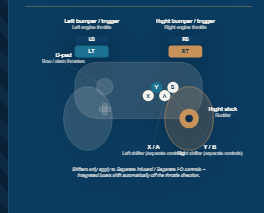
 There is Gamepad support. This works for both wired and wireless Gamepads. Here is the mapping:
The Boat Docker — Xbox Controller Map
| Control | Xbox Button | Gamepad API Index |
|---|---|---|
| Right engine throttle up | RB (Right Bumper) | 5 |
| Right engine throttle down | RT (Right Trigger) | 7 |
| Left engine throttle up | LB (Left Bumper) | 4 |
| Left engine throttle down | LT (Left Trigger) | 6 |
| Left shifter up (F/N/R) | X | 2 |
| Left shifter down (F/N/R) | A | 0 |
| Right shifter up (F/N/R) | Y | 3 |
| Right shifter down (F/N/R) | B | 1 |
| Rudder left / right | Right Stick (X-axis) | axis 2 |
| Bow thruster — left | D-pad Left | 14 |
| Bow thruster — right | D-pad Right | 15 |
| Stern thruster — left | D-pad Down | 13 |
| Stern thruster — right | D-pad Up | 12 |
Notes
- Left/right shifter controls (X/A and Y/B) only apply to boats with separate shifter and throttle controls. On integrated-control boats, the shifter engages automatically from the throttle buttons.
- Rudder input is analog — the further you push the right stick, the faster the rudder moves. A small deadzone near center prevents drift from stick noise.
- All four thrusters are grouped on the D-pad for quick, intuitive nudging: bow thruster uses D-pad Left/Right, and stern thruster uses D-pad Up/Down.
Send your comments and suggestions to theboatdocker@gmail.com.
Thanks.